

The best web-to-print solution helps customers buy the print they need and gives your team a clear job to produce. It should reflect your products, prices, artwork requirements and the way your business works.
For some printers, that starts with a public online shop. For others, the opportunity is a private company portal where branches and colleagues can order approved print. Many businesses need both, with their own production and selected trade suppliers behind the range.
This guide compares PressFlow, Online Print Solution, VB Media, Vpress, Infigo and OnPrintShop, with a focus on the buying priorities each approach can suit.
PressFlow coverage and the price comparison reviewed 21 November 2026. Competitor feature publications reviewed 25 October 2026. Published by PressFlow. Feature and price information comes from provider publications, the current PressFlow release and the dated OPS brochure identified below. The example-storefront speed tests are measured separately from the editorial feature comparison.
Six web-to-print solutions worth considering
The strongest shortlist starts with your business model. The table below gives a useful starting point for evaluating the six approaches.
| Platform | A useful starting point | Demonstrate with your own work |
|---|---|---|
| PressFlow | WooCommerce print shops combining public ordering, private company portals and connected job management, with self-installation or a tailored website build | Your pricing, artwork, company purchasing and production journeys |
| Online Print Solution | A provider-led print ecommerce project with configurable modules, private storefronts and marketing services | The proposed modules, website scope and workflow connections |
| VB Media | Hosted print ecommerce with trade-supplier connections | Your supplier range, required tier and editor subscriptions |
| Vpress | Corporate print procurement and controlled personalisation | Approved templates, brand controls and production handoff |
| Infigo | Personalised B2B/B2C storefronts connected to production systems | The design experience and your MIS or prepress integration |
| OnPrintShop | A broad print-commerce project spanning retail, corporate, trade or franchise operations | The customer types, features and integrations in your proposal |
THE FULL PRINT-SHOP EXPERIENCE. BUILT FOR SPEED.
A working print shop.
A fast first impression.
Live pricing, the online designer, Quick Order, B2B storefronts and production tools are all enabled on this working demo. Explore the full print-shop experience and see its PageSpeed Insights scores.
Explore the live showcaseShowcase homepage
96 Mobile 100 Desktop
View product-page reports: mobile · desktopHomepage: PageSpeed Insights · . Mobile report · Desktop report.
Product-page scores: three-test medians · 25 October 2026.
What makes a good web-to-print solution?
Compare the platforms against the work your business sells. Use the same product, artwork and purchasing examples for each demonstration.
Clear print choices and complete-job prices
Customers need understandable sizes, materials, finishes, quantities and production options. The displayed price should describe the complete job. Try a quantity break, a finish change and a custom-size product using specifications from your own range.
Artwork that stays connected to the job
Follow artwork from creation or upload through automated checks, staff review and customer proof approval. Check that files, versions and decisions remain linked to the exact ordered specification.
An ordering route for company customers
If you serve companies, demonstrate an approved catalogue, agreed pricing, a locked template and a repeat order. Include colleague roles, branch addresses and any financial approval or account-credit process you need.
A practical route into production
Staff need the specification, artwork status, proof decision and next action together. Follow one job through assignment, production and dispatch, then demonstrate any external-system handoff included in the proposed setup.
Compare the features your print business will use
A designer, private portal or approval workflow can sit in very different packages. This table compares the published scope, including where a tier or external service is involved. Both PressFlow plans include every built-in feature and integration.
On a phone, swipe the table sideways. “Confirm” means the exact requirement needs a demonstration or written scope; it does not mean the platform lacks the feature. OPS tier references use its Print Show 2026 reseller brochure.
| Requirement | PressFlow | Online Print Solution | VB Media Pro | Vpress | Infigo | OnPrintShop |
|---|---|---|---|---|---|---|
| Website foundation | WordPress / WooCommerce: use the plugin on your own site or choose a complete website build by Fell & Harbour. Your choice of hosting and theme. | Provider-led WordPress print ecommerce implementation. | Hosted platform; hosting included in its plans. | Coreprint storefronts or an embedded editor for an existing shop. | Hosted B2B/B2C storefront platform. | Hosted print-commerce plans with managed infrastructure. |
| Print prices and quotations | Fixed jobs, quantities, matrices, area and size bands, quotes and quantity/date comparison. | Print-price engine in Starter; quotation module in Growth on the show brochure. | Pricing and quotations; visual options and quantity discounts depend on plan. | Print procurement and configurable products; confirm your estimating requirements. | Configurable products and pricing; demonstrate your estimating rules. | Dynamic pricing and quote management listed from Basic. |
| Online design | Native artwork designer included; optional Canva connection uses your own app/account. | Editable templates listed in Enterprise; provider also documents IDML template tools. | Pro lists PitchPrint integration; a separate PitchPrint subscription is required. | Personalisation/editor routes across Coreprint offerings. | MegaEdit prepared-template and blank-canvas editing. | AI designer and template tools listed from Startup. |
| Locked brand templates | Locked layouts with controlled text, approved image choices and private brand fonts; reviewed IDML text-frame import, JSON and named PDF form fields. Reopen the company template in desktop InDesign and save IDML with the fixed artwork as a linked PDF. Use CSV for batches of personalised jobs. | Editable templates in Enterprise; confirm field and brand controls. | Demonstrate required field restrictions in the chosen editor. | Corporate personalisation and brand-controlled templates. | Template controls through MegaEdit. | B2B template and brand-control tools; confirm plan scope. |
| Private company portals | Public shop plus private catalogues, or B2B-only ordering. Dedicated branded storefront addresses, company prices, branch delivery, roles and repeat-order tools. | Unlimited private portals in Enterprise on the show brochure. | Private storefronts listed in Standard and Pro. | Coreprint Complete centres on unlimited branded B2B storefronts. | B2B storefronts; scope storefront count and additional modules. | Pro lists 10 B2B storefronts; wider enterprise scope by agreement. |
| Approvals and account credit | One/two-level financial review, PO references and authorised credit. Optional monthly/quarterly company and branch budgets with committed/spent reporting and over-budget review. | Order approvals in Enterprise; confirm account billing. | Credit accounts listed; confirm approval hierarchy requirements. | Corporate procurement workflows; demonstrate your approval and billing rules. | B2B setup and modules; confirm approval and payment rules. | B2B approvals, budgets, roles and credit/cost-centre billing tools. |
| Artwork and proofs | Built-in product-specific checks explain found/required size, pages, bleed and image detail, with visual trim guides. Private versions, staff checks, separate proof approval, retention and storage visibility; optional specialist prepress. | Automated artwork checks in Growth; proofing described in platform information. | Embedded uploads in Pro; confirm proof and preflight scope. | PDF validation and workflow integration options. | Editor and production/prepress integration options. | Uploads in Basic; design proofing in Startup and above. |
| Own and trade-supplier range | Sell your own print alongside Tradeprint, WTTB and Solopress through Dock. Supplier routing compares live cost, estimated delivery and margin from WTTB and Tradeprint for the same mapped job while keeping customer and agreed company prices. printIQ provides a separate MIS quote and job handoff. | Trade-supplier API in Starter on the show brochure. | Published integrations include Tradeprint, Solopress and Venture Banners. | Confirm the exact supplier workflow in your proposal. | Confirm supplier-specific mappings and connector scope. | Confirm supplier-specific integrations in the chosen plan. |
| Production workspace | Individual jobs, list/Kanban, assignments, flags, tickets and dispatch. Private reports cover overdue/blocked work, turnaround, quote conversion and recorded costs/contribution, with CSV and print/PDF views. | Back-office workflow; confirm stages, staff screens and reporting. | Order management; demonstrate the production screens you need. | Automated production workflows; confirm the proposed back-office scope. | Production-system connections; demonstrate the complete handoff. | Order workflow tools and production-user allowances by plan. |
| Planning and materials | Optional finite machine planning, material movements, purchasing and reviewed costing recipes. | Confirm scheduling, stock and costing scope separately. | Confirm scheduling, stock and costing scope separately. | Stock/procurement functions; scope your production-system integration. | Scope these functions with your connected production systems. | Confirm manufacturing and inventory scope in your proposal. |
| Developer extensibility | WordPress hooks, versioned authenticated job API and signed events; WooCommerce ecosystem. | Provider-led modules and integrations. | Published integrations and hosted-platform support. | Embedded technology and workflow integrations. | API/Flow and additional integration modules. | Integration and API scope depends on package/project. |
| Specialist applications | Demonstrate unusual processes, packaging and output requirements against your own jobs. | Confirm specialist products and editor requirements. | Confirm specialist products and editor requirements. | Assess VDP, procurement and workflow against the project. | Additional modules include packaging/3D and enterprise purchasing tools. | 3D/design and wider enterprise functions vary by plan. |
PressFlow 2.4.1 checked 21 November 2026: PressFlow features. Competitor sources reviewed 25 October 2026: OPS ecommerce and its printed reseller brochure; VB Media plans and features; Vpress Coreprint; Infigo editor and additional modules; OnPrintShop plans and B2B storefronts.
More control for company and supplier orders
Company ordering is more useful when the approved design, the purchaser’s work and the spending rules connect. PressFlow now brings that into the same WooCommerce shop:
- A branded company storefront: a dedicated address with the company’s approved products, template gallery, agreed prices and repeat-order tools.
- CSV team personalisation: map spreadsheet columns to approved text fields and image choices, check each person’s PDF and quantity, then create separate named print jobs. Save progress and resume an interrupted batch. The fixed logo, fonts, colours and layout stay controlled.
- Company and branch budgets: monthly or quarterly allowances, committed versus spent amounts, available balances and a warning or financial-review policy for over-budget orders.
- Clearer artwork guidance: explain measurable size, pages, bleed and image-detail findings against the selected product before the customer saves the files.
- Business reporting: overdue and blocked jobs, turnaround, quote conversion and eligible recorded job contribution, with private CSV and print/PDF views.
These tools are included in the PressFlow licence. A team spreadsheet uses native locked templates; existing payment, financial review, artwork acceptance and customer proof decisions still govern the job.
Ask every shortlisted provider to demonstrate the same example: import several people’s card details, change quantities per person, order for two branches, trigger a budget review and trace the approved files into production. Then compare the report and exports with the original jobs.
Explore team personalisation · See company spending controls · See Business reports · Try the company roles
Compare the complete running cost
Compare the finished scope alongside the licence charge. Include website implementation, hosting, catalogue and template preparation, support, maintenance, artwork tools and the connections you will use. Some packages combine several of these services; others let you choose them separately.
Buying a storefront for printIQ?
PressFlow supports mapped stock items, manufactured products and configured bespoke printIQ templates. Its shop uses verified prices calculated by printIQ and refreshed on schedule, then sends reviewed jobs, delivery and approved artwork into your existing production workflow. Staff can also create offers and orders, split eligible in-house runs across delivery addresses and queue approved production packages for a private print-room hot folder. PressFlow’s included receiver delivers the reviewed ZIP and records a receipt.
Infigo documents on-demand printIQ pricing, stock and product sync, and custom quoting. Flex4 offers print MIS integrations and bespoke development. If you are considering an OPS deployment with printIQ, ask to see the pricing, job and status workflow for one of your products. For invoicing through Xero, confirm that separately with your printIQ account.
Explore PressFlow and printIQ · Infigo documentation · Flex4 integrations · printIQ integrations
First-year pricing and savings
| Package | Setup and subscription | First-year cost | First-year difference with PressFlow | What the price covers |
|---|---|---|---|---|
| Bespoke website and software | ||||
| PressFlow + custom websiteExample with optional managed hosting | £1,250 to £2,500 one-off build £99/month or £999/year for PressFlow £45/month hosting (£540 in year one) | £2,789 to £4,039 with Annual £2,978 to £4,228 with Monthly | A custom WooCommerce shop built and launched by Fell & Harbour. This example includes 12 months of optional managed hosting in the total. Catalogue setup and ongoing website care are scoped separately. | |
| OPS EnterpriseClosest match to PressFlow’s features | £9,929 setup £350 / month | £14,129 | Custom website and managed hosting Annual £10,090 to £11,340 less Monthly £9,901 to £11,151 less Existing site, licence only Annual £13,130 less Monthly £12,941 less Existing site with managed hosting Annual £12,590 less Monthly £12,401 less | Bespoke design, editable templates, private portals and order approvals. Flex4’s OPS package guide lists hosting. Check the hosting terms in your quote. |
| Existing sites and hosted storefronts | ||||
| PressFlow Monthly | £99/month Managed hosting £45/month if chosen | £1,188 licence only £1,728 with managed hosting | All built-in features, including the native designer, plus updates and standard support. | |
| PressFlow Annual | £999/year Managed hosting £45/month if chosen | £999 licence only £1,539 with managed hosting | All built-in features, including the native designer, plus updates and standard support. Save £189 over 12 monthly payments. | |
| VB Media Pro | £99 sign-up £99 / month | £1,287 | Existing site, licence only Annual £288 less Monthly £99 less Existing site with managed hosting Annual £252 more Monthly £441 more | Pro subscription, standard sign-up fee and hosting. Online design requires a separate PitchPrint subscription. Optional setup services are priced separately. |
| VB Media Pro + PitchPrint StarterClosest match to PressFlow’s features | £99 sign-up £99/month for VB Media Pro US$470/year for PitchPrint Starter | About £1,645 £1,287 for VB Media Pro plus about £358 for PitchPrint | Existing site, licence only Annual about £646 less Monthly about £457 less Existing site with managed hosting Annual about £106 less Monthly about £83 more | VB Media hosting and online design using PitchPrint’s public Starter annual rate. Starter lists 150 customer orders per month. Additional completed projects may incur usage charges. |
| Other packages and quotes | ||||
| OPS Starter | £1,869 setup £95 / month | £3,009 | Existing site, licence only Annual £2,010 less Monthly £1,821 less Existing site with managed hosting Annual £1,470 less Monthly £1,281 less | Core ecommerce, print-price engine, supplier API, training and support. |
| OPS Growth | £4,660 setup £195 / month | £7,000 | Existing site, licence only Annual £6,001 less Monthly £5,812 less Existing site with managed hosting Annual £5,461 less Monthly £5,272 less | Adds customisation, automated artwork checks, quotations and further integrations. |
| Vpress / Infigo / OnPrintShop | Confirm setup, package and modules | Quote required | Depends on the quote | Agree storefronts, editor, integrations, implementation and ongoing services. |
See PressFlow pricing, VB Media pricing and Flex4 OPS resources. The OPS calculations use the printed Flex4 Print Show 2026 reseller brochure. Ask Flex4 for a current quote. The PitchPrint example uses the published Starter annual price, converted at the ECB reference rates for 20 November 2026 (US$1 ≈ £0.762).
How the Print Show discounts were removed
The 2026 flyer advertised 20% off Starter, 25% off Growth and 30% off Enterprise. We applied each percentage to the setup fee and reversed the discount as follows.
- Starter £1,868.75 (£1,495 ÷ 0.80).
- Growth £4,660.00 (£3,495 ÷ 0.75).
- Enterprise £9,928.57 (£6,950 ÷ 0.70).
First-year figures add 12 monthly payments at the rates printed on the flyer. The table rounds the totals to the nearest pound.
For a longer view, use the price for each term under the current purchase and renewal terms. Include hosting, catalogue setup, site maintenance and any external services in your budget.
Why Web-to-Print Projects Stall (And How to Prevent It)
Pricing the whole catalogue at once
Start with one product you already sell. Choose from 15 draft product blueprints, paste prices from a spreadsheet into the pricing grid, and check worked price previews. If you have the specs and prices ready, make your first afternoon about getting that product ready for a test order.
See the product setup stepsMaking staff chase job details
Ask the person who will process orders to run a sample job. PressFlow’s Kanban board shows jobs by stage. The job view keeps the specification, artwork, approved proof and next step together.
Try the operator workspacePaying for a build before trying it
Before committing £5,000 or more to a project, configure a job, upload artwork and follow it through proof and production. Try the complete workflow in the live showcase. Direct PressFlow licence purchases have a 30-day no-quibble refund. Website builds are quoted separately.
Read the licence refund termsThe six platforms in more detail
The comparison above gives you a shared starting point. These profiles explain each approach and what to demonstrate before choosing it.
PressFlow: your WooCommerce shop, connected for print
PressFlow brings print configuration, pricing, artwork, company ordering and production tools into WordPress and WooCommerce. You can use the plugin in your own implementation or commission a tailored website from Fell & Harbour, the creators of PressFlow.
That gives you a choice of how the website is delivered, with your brand, catalogue and working process at the centre of the project.
Sell your products the way you price them
Configure clear product choices and use the pricing approach that suits each product: fixed jobs, quantity tables, specification matrices, area rates, size bands or a quote-only route. Customers can compare available quantities and production options, then keep the selected specification and complete-job price with the order.
Product blueprints create configured draft ranges for digital print or wide-format shops. Guided setup, spreadsheet imports and reusable product configurations help prepare the catalogue. Review the sample prices and artwork rules, then publish the products you want to sell. Pricing tools can compare your entered production costs with an estimated contribution, while example checks and Ready to sell bring the product’s setup together before publication.
Give customers useful artwork tools
The included native online designer lets customers create artwork with text, images and shapes on correctly mapped products. Blank PDF guides can reflect the product’s configured dimensions, bleed and printed sides or pages.
Customers can also supply labelled files through the artwork methods configured for the product. Built-in artwork checks compare measurable files with the ordered requirements: page counts, finished PDF dimensions and bleed space, plus image proportions and effective resolution. Files needing attention are flagged for review. Artwork versions and customer proof decisions stay connected to the job, and a professional final artwork check is recommended.
An optional configured Canva connection provides another artwork route for eligible products and approved company templates. It uses the shop’s own app and the relevant Canva account permissions, plan and content entitlements. Your team continues to review the returned artwork through the configured job workflow.
Make repeat company print easier to buy
Private company portals give approved customers their own catalogue, agreed prices and shared print library. You can run a public shop alongside company portals, or choose a company-portals-only setup.
Invite colleagues with appropriate company roles, connect approved branch addresses and make prepared products available to the right people. Native locked brand templates let colleagues personalise permitted text and select approved images while fixed logos, company fonts, colours and layout remain controlled.
For artwork prepared in InDesign, PressFlow supports reviewed IDML text-frame imports with font mapping, alongside JSON and named PDF form fields. Its included desktop exporter prepares the background and field settings. A private export package rebuilds the company template’s editable text frames in desktop InDesign so your studio can save a new IDML file. The fixed design stays on a linked PDF background. The export is available to the printer or company administrator. See the InDesign template workflow.
For companies with a purchasing process, optional financial approvals can provide one or two review levels. Authorised account credit adds agreed limits, payment terms and purchase-order references. Financial review and artwork proof approval each retain their own purpose within the order journey.
Supplier routing for WTTB and Tradeprint. Compare both suppliers’ live cost, margin and estimated delivery for the same specification. PressFlow can recommend the lowest-cost eligible supplier whose estimate meets the customer’s date. Your team can choose, or let PressFlow assign after payment, artwork acceptance and proof approval. The supplier connector controls submission. See the Supplier Choice walkthrough.
Connect your own print and supported suppliers
PressFlow supports selling your own production alongside Tradeprint, WTTB and Solopress products through the official Dock plugin. Its printIQ connector brings mapped products and verified prices into the shop. Choose whether to send jobs and approved artwork manually, prepare quotes for review, or hand off eligible approved jobs automatically.
The Tradeprint connector uses verified mapped choices and a saved local supplier-price index, with selling-price markup and a reviewed supplier-order handoff. It currently supports GBP shops and uses your own supplier account.
Solopress products follow the official Dock configuration, artwork and supplier-order tools. Company portals and Quick Order use their eligible native PressFlow and supported Tradeprint product routes. Each product follows the workflow prepared for it.
Keep the order clear through checkout and production
Quick Order lets customers prepare several eligible jobs in one workspace, with separate specifications, references, prices and artwork choices. The print-focused basket and checkout keep each job easy to review while WooCommerce handles the shop’s payments, tax and shipping.
Behind the shop, list and Kanban views, assignments, flags, job tickets and dispatch information help the team follow individual jobs through production. Quotes, saved specifications and repeat ordering support the next conversation and the next run.
Why PressFlow deserves a place on your shortlist: it connects public print sales, repeat company ordering and the print-room workflow inside a WooCommerce shop you control. You can build around the plugin with your own team or choose a tailored website project.
PressFlow is £99/month with automatic billing, or £999/year with manual renewal. Both plans cover one live shop and one staging installation, with every built-in feature, releases and standard product support. The annual plan saves £189 over 12 monthly payments. See the licence options and refund terms.
Website design and build is quoted separately to the agreed scope. Hosting, domains, payment processing, supplier production and delivery, and optional external services are arranged separately.
Explore every PressFlow feature · Compare licence prices · Discuss a tailored website
Online Print Solution: a provider-led print ecommerce project
Online Print Solution, or OPS, is Flex4’s print-commerce offering. Its published approach combines a core platform with design, software modules and integrations. The range includes public ecommerce, private client storefronts and digital marketing services.
OPS also describes product pricing, quotation, proofing and template tools, including an InDesign IDML import route. It is a relevant option when you want to consider the website, implementation and customer acquisition as a provider-led project.
Focus the evaluation on: the proposed modules, product setup, integrations, training and ongoing services in your written scope.
Sources: OPS print ecommerce and reseller offering.
VB Media: hosted print ecommerce and supplier connections
VB Media offers hosted print websites with public, private-storefront and trade use cases. Its published platform includes quotations, order management and connections to print-trade suppliers.
This comparison uses VB Media Pro at £99/month because it includes embedded artwork uploads and supports online design. VAT applies where applicable, and there is a £99 signup fee unless you buy a setup service. Online design requires a separate PitchPrint subscription.
Focus the evaluation on: your supplier coverage, the tier and integrations you need, and the complete cost of editor and setup services.
Source: VB Media plans and pricing.
Vpress: corporate procurement and controlled personalisation
Vpress’s Coreprint platform combines customisable templates, personalisation, automated workflows and connections to existing business systems. Its Embedded Tech offering provides an editor route for adding personalisation to an existing ecommerce website.
Vpress is a relevant option for projects centred on corporate print procurement, approved designs and brand consistency.
Focus the evaluation on: a representative company template, the controls customers use and the resulting handoff into your production process. Include the embedded approach where retaining an existing storefront is part of the brief.
Source: Vpress products.
Infigo: personalised storefronts and production integration
Infigo’s published offering covers B2B and B2C storefronts, online personalisation and connections to MIS, prepress and fulfilment systems. Its MegaEdit editor supports prepared templates and designs created from a blank canvas.
That makes it a relevant option where the customer’s design experience and the systems receiving the finished order are both central to the project.
Focus the evaluation on: your actual products in the editor, followed by the intended MIS or prepress handoff. Include implementation, ongoing maintenance and training in the proposed scope.
Source: Infigo web-to-print software.
OnPrintShop: a broad print-commerce implementation
OnPrintShop markets solutions for retail, B2B, trade, reseller and franchise operations across a range of print segments. Its published platform includes print estimation, design proofing, order management and workflow automation.
It is a relevant option when the project needs to bring several customer types or print-commerce operations into a wider implementation.
Focus the evaluation on: the specific storefronts, product range, features and integrations included in your proposal. Follow one representative order through the customer and staff journeys, and include the team’s training requirements.
Source: OnPrintShop platform overview.
How fast are the example print storefronts?
Latest showcase homepage result, 11 November 2026: 98/100 mobile and 100/100 desktop. View the latest mobile report · desktop report. The table below retains the original dated three-test medians.
We tested the named example storefronts below using Google PageSpeed Insights on 25 October 2026. Each result is the median of three tests, with mobile and desktop measured separately. PressFlow’s live pricing, Quick Order, online designer, B2B storefronts and production tools remained enabled throughout.
Homepage performance
| Example storefront | Mobile / 100 | Desktop / 100 |
|---|---|---|
| PressFlow showcase | 95 | 99 |
| VB Media / Print Home | 81 | 99 |
| Online Print Solution demo | 30 | 66 |
| OnPrintShop / Roadrunner | 64 | 87 |
| Infigo / HP Atlanta demo | 54 | 79 |
Business-card product pages
| Example storefront | Mobile / 100 | Desktop / 100 |
|---|---|---|
| PressFlow showcase | 96 | 100 |
| VB Media / Print Home | 88 | 94 |
| Online Print Solution demo | 51 | 73 |
| OnPrintShop / Roadrunner | 61 | 70 |
Named example storefronts tested on 25 October 2026 using Lighthouse 13.5.0. Select a score to view a supporting report. Infigo’s HP demo is included in the homepage tests only; no equivalent business-card page was identified. Vpress is omitted because a direct public print storefront was not verified.
PressFlow recorded the highest median mobile performance score among the tested examples on both the homepage and business-card page. Try the live print configurator and explore the customer journey yourself.
How the comparison was tested
These are initial-load laboratory tests of the named sites, not a ranking of each platform’s technical limits. Design, hosting, content and third-party scripts affect each result. We used the same PageSpeed Insights service and three analyses per URL on the same day, with mobile and desktop medians calculated independently. Features stayed enabled on the PressFlow showcase.
Print Home identifies itself as a VB Media example site. OPS Demo links to the business-card page on latest.opsdemo.co.uk. Roadrunner is identified in OnPrintShop’s customer case study. The HP Atlanta demo is linked from Infigo’s HP partner page.
GOS uses Coreprint within EvolutionX, as described in Vpress’s integration case study. Its general homepage would not isolate the Vpress print experience, so it is not included as a Vpress speed result.
Which web-to-print approach fits your business?
An independent printer building on WooCommerce
Shortlist PressFlow when you want control of your website, your own products and a choice of hosting. The built-in toolset brings pricing, design, corporate ordering and production together in a single licence. Choose a self-installation or a scoped website build.
A reseller combining suppliers and in-house print
PressFlow supports your own production alongside supported Tradeprint, WTTB and Solopress / Dock routes, with printIQ available for a connected MIS workflow. Compare that with VB Media’s hosted supplier range and OPS’s reseller packages. Demonstrate the exact products, markups and artwork handoff you intend to sell.
A printer serving branches, franchises or corporate buyers
Put a real locked template, private catalogue, purchasing approval and repeat order at the centre of the demonstration. PressFlow includes these tools. Vpress, Infigo, OnPrintShop, OPS and VB Media also offer corporate storefront approaches, with differing package and implementation scope.
A specialist or enterprise production project
For complex packaging, advanced variable data, punchout procurement or a deeply integrated factory workflow, compare the specialist modules and implementation services directly. Ask every provider to process representative work and identify the system responsible for each production decision.
See how PressFlow connects the customer to the print room
One specification. A clear choice of quantity and date.
Customers choose illustrated materials and finishes, then compare complete-job prices across quantities and available production dates. Each selection updates the summary and artwork requirements. VAT display can switch without changing the job calculation.
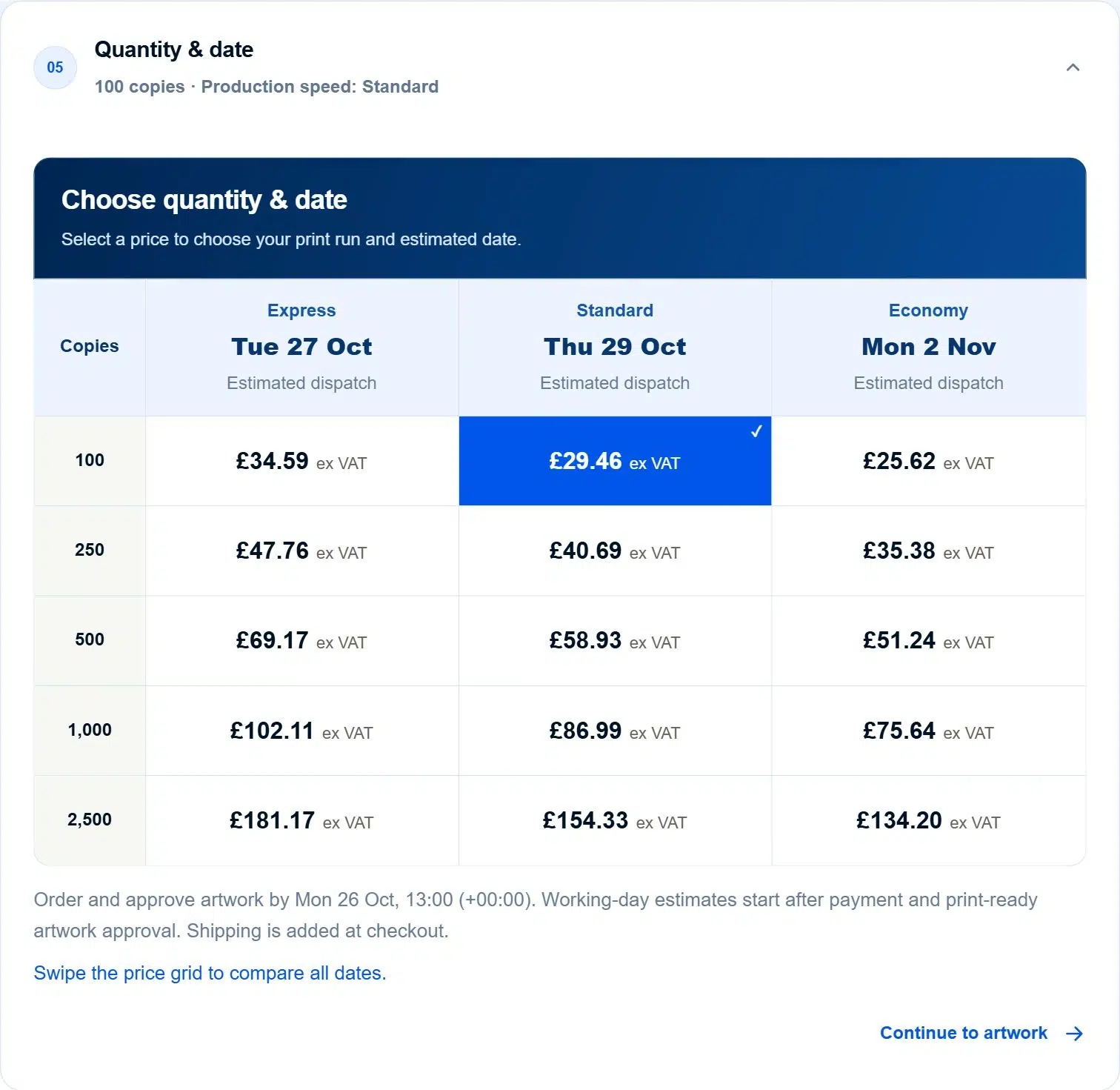
Try the business-card configurator · Read the setup guides
Several jobs, one ordering workspace.
Quick Order lets a regular buyer search for eligible products and prepare several different print jobs before adding them to the basket. Each job keeps its own quantity, choices and reference, with artwork managed against the right item.
A controlled route for corporate customers.
Company purchasers see approved products and agreed prices. A colleague can update permitted details in a locked brand template, use a branch address and follow the company’s configured approval or account-credit route. Order history and the shared library make the next run easier.
Explore the purchaser, approver and operator demo logins · See company portals
A workspace built around individual print jobs.
Each print job carries its specification, artwork status, proof decision, assignments and flags into production. Switch between the list and Kanban, open the job ticket and follow the work through your stages. Optional capacity planning, materials, purchasing and costing tools extend the same workspace.
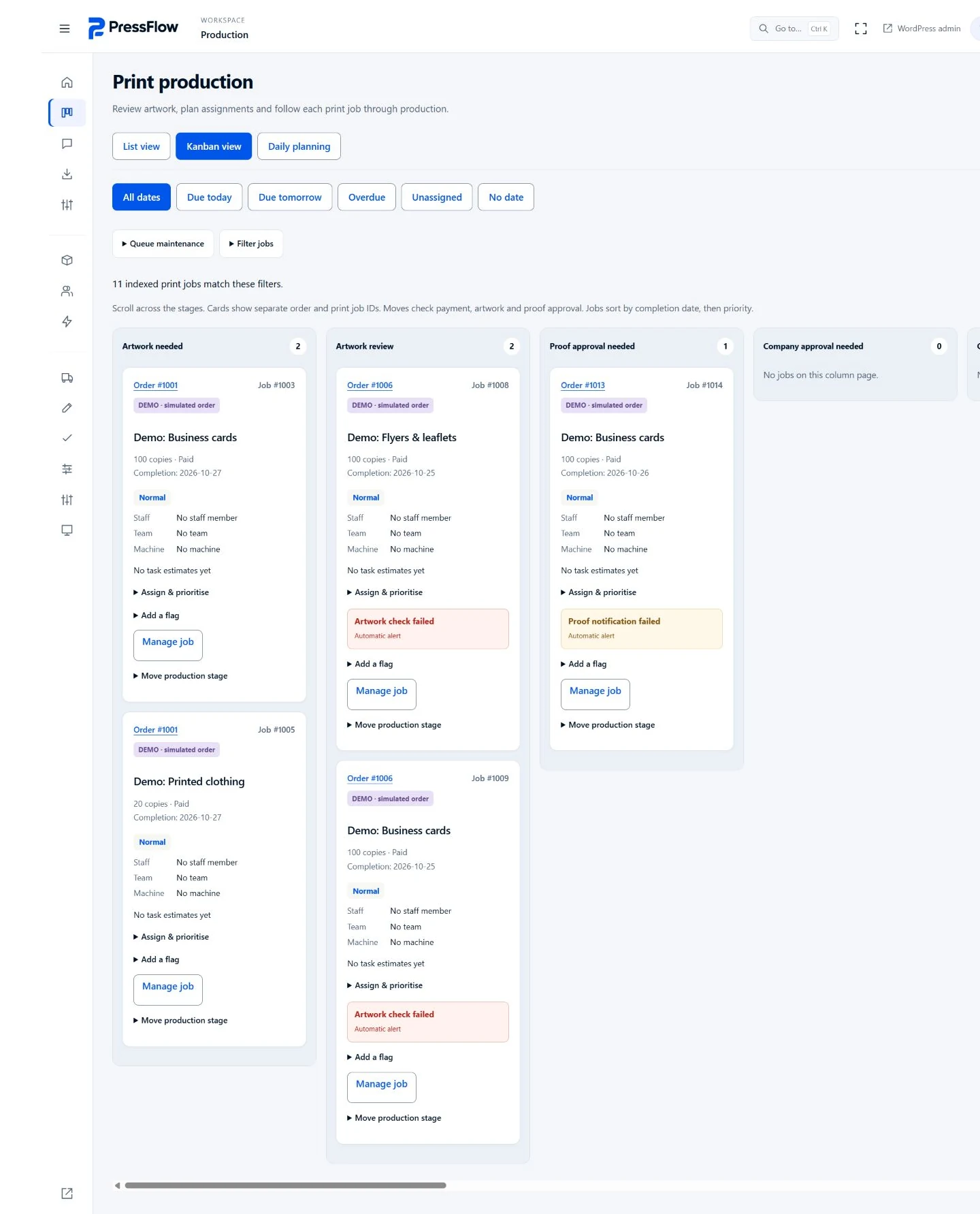
Developers can extend the shop through WordPress hooks, the authenticated print-job API and signed job events. Your WooCommerce shop retains its own tax, payment and shipping setup.
Explore the production dashboard guide · View the full feature set
Why PressFlow could be the best web-to-print solution for your shop
For printers choosing WooCommerce, PressFlow combines a public shop, private company ordering and production tools under one licence. Use the plugin with your own team or commission a complete website from Fell & Harbour. The customer journey stays connected to the specification, artwork and decisions your team needs to produce the job.
Evaluate a real customer journey
Choose examples your team recognises and follow them from beginning to end.
- A public print order: select a product, compare quantities and production choices, supply artwork and review the job at checkout.
- A company order: sign in with a prepared company account, select an approved product and follow the configured purchasing process.
- A personalised template: change the permitted details and review how the prepared artwork reaches the job.
- A repeat order: start from saved choices or a shared library and see how the current specification and price are checked.
- A production handoff: follow the specification, artwork review and customer proof decision into the staff workflow.
Use prepared, authorised accounts for company and staff demonstrations. The public showcase provides a starting point for exploring the customer-facing ordering experience.
Frequently asked questions
What is the best web-to-print solution for a small print business?
Choose around the jobs you sell, the customers you serve and the support you want. PressFlow suits businesses choosing WordPress and WooCommerce for their shop, with the option of self-installation or a tailored website build. Hosted and provider-led platforms offer other delivery approaches to assess against the same brief.
Does PressFlow include an online artwork designer?
Yes. The native designer is included and lets customers create artwork with text, images and shapes on correctly mapped products. Blank PDF guides and saved-design tools support configured artwork workflows. The setup guides explain the product mapping and PDF output, and your team retains responsibility for the artwork review.
Can PressFlow provide private company print portals?
Yes. Approved companies can have their own products, prices, colleague roles, branch addresses and a shared print library. You can combine private portals with a public shop or choose company portals only.
Can company customers personalise approved brand templates?
Yes. Native locked templates let colleagues change permitted text and select approved images while logos, company fonts, colours and layout remain controlled. CSV team personalisation applies the same controls to each person’s artwork. A configured Canva company-template route is also available with the relevant app, account and provider permissions.
Does PressFlow support company approvals and account credit?
Yes. Optional company financial approvals support one or two review levels. Explicitly authorised company credit accounts can use agreed limits, payment terms and PO references. These purchasing tools work alongside the job’s artwork and proof process.
Can I sell my own print alongside supplier products?
Yes. PressFlow combines your own products with supported Tradeprint and WTTB imports and Solopress products through the official Dock plugin. WTTB orders can be reviewed for in-house or supplier fulfilment. The printIQ connector supports mapped product pricing and a reviewed MIS handoff. Each product follows its configured artwork and fulfilment route; supplier accounts, production and delivery are arranged separately.
How much does PressFlow cost?
The PressFlow licence costs £99/month or £999/year. Both plans include every built-in feature, one live shop, one staging installation, updates and standard support. A custom website build and external running costs are separate.
Can PressFlow design and build the complete website?
Yes. Fell & Harbour can plan, design and configure a website around your brand, print catalogue and working process. The project is quoted to an agreed scope covering the included catalogue work, licence, hosting and ongoing services.
Which web-to-print demo was fastest in these tests?
PressFlow’s showcase recorded the highest median mobile performance among the named examples tested: 95/100 for its homepage and 96/100 for its business-card product page. The tables above link to dated PageSpeed Insights reports and explain how the three-run medians were calculated.
Are online designers and private portals always included?
Package structures differ. PressFlow includes its native designer and company portals. VB Media lists a separate PitchPrint subscription for its Pro editor integration. OPS’s show brochure places editable templates and unlimited private portals in Enterprise. Check the relevant provider’s package for your chosen design and company-ordering workflow.
Use the same job to compare the complete offering.
Bring a representative product, company template and staff handover to each demonstration. Compare the website implementation, included features, external services, support and complete running cost. Use the dated storefront speed evidence above alongside the workflow test.
With PressFlow you can choose the complete plugin for your own WooCommerce implementation, or a website planned, designed and configured by Fell & Harbour.

