
Production
Use the production list, board and job ticket
Find individual print jobs and understand the readiness gates behind their stages.
Guide source reviewed for PressFlow 2.0.5.
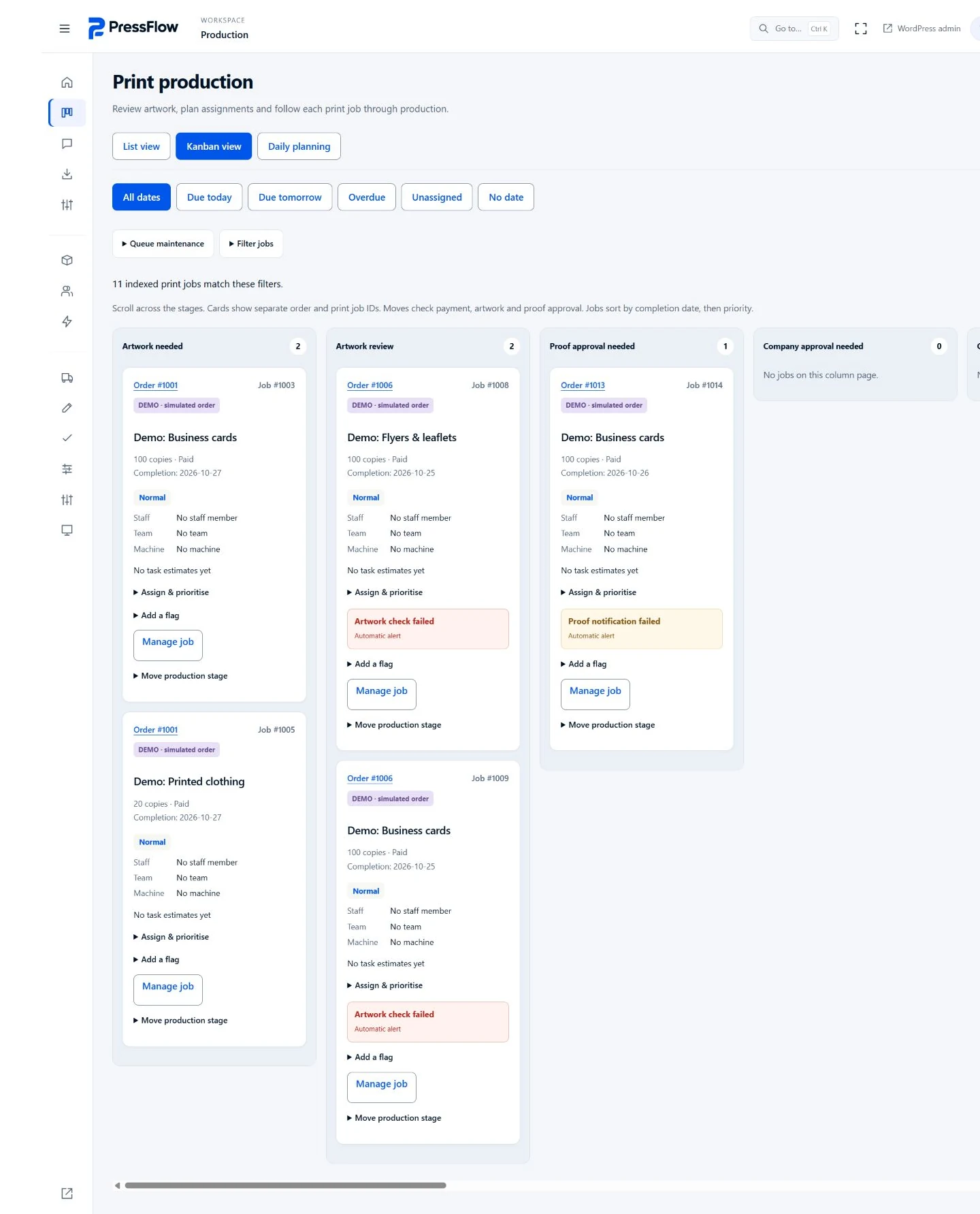
Open PressFlow workspace → Production. Use the list for searching and detailed scanning, the board for a view by stage and the daily view for date-based planning. Each row or card represents a print job, not necessarily the whole WooCommerce order.
Use the workspace navigation to move between jobs, quotes, products and setup. Focus view gives the queue more room; WordPress admin returns to the standard dashboard. Operators see only the work and actions their assigned permissions allow.
Identify a job
The ticket shows its WooCommerce order reference and print-job ID. The job ID is the order item identifier. Custom order-number plugins can change the displayed order reference without changing the underlying order ID used by internal filters.
Use product, stage and the available planning filters to narrow the queue. The board has bounded columns with paging, rather than attempting to load every order. Open a ticket to review artwork, proof, specification, next action, flags, assignment and history.
What the stages mean
| Stage | Meaning |
|---|---|
| Artwork needed | The required current artwork is missing or unavailable. |
| Artwork review | Staff/checking decisions are still needed. |
| Proof approval needed | The current proof awaits the customer's decision. |
| Changes requested | The customer or review workflow requires a correction. |
| Payment needed | The order has not met the payment requirement. |
| Company approval needed | The company purchase request needs its required financial approval. |
| Credit account review | The account terms or credit decision must be resolved before release. |
| Ready to print | Current readiness requirements are satisfied. |
| On hold | Staff have explicitly paused the job. |
| Printing | Production has started. |
| Finishing | The job is in finishing. |
| Dispatched | Delivery or collection fulfilment has been recorded. |
| Closed | The order/job context is closed to the normal workflow. |
Some stages are derived from the job's current requirements. They are not interchangeable labels that staff can drag around to bypass approval.
Start and progress production
Use the ticket/card's supported stage action. The board uses explicit actions, not drag-and-drop. Printing requires the applicable payment or approved account conditions, accepted current artwork, cleared checks or a valid manual clearance, required current proof approval, available files/link and no active blocking flags. A closed job cannot be started.
If an action is refused, read the current reason and resolve its cause. Setting an unrelated WooCommerce order status or refreshing the page does not replace the missing decision.
Starting printing locks artwork. Later finishing/dispatch and a hold after starting do not silently reopen editing. Each job progresses independently, so an order with three jobs can have three different stages.
History
The private job history records supported changes with actor, reason and before/after information. It is bounded to recent entries; it is not an unlimited audit archive. Public progress omits staff-only notes. Export or back up records according to your own recordkeeping needs.
Related: Flags and holds, Planning, Dispatch.
Need a hand?
Contact the PressFlow team with details of what you are trying to do.