
PRESSFLOW 2.3
Give every branch a clearer spending allowance.
Give each branch room to order the print it needs and give managers a clear view of what is left to spend. Use monthly or quarterly budgets and route exceptions for review.
ALLOWANCES THAT MATCH THE COMPANY
Company-wide control. Branch-level detail.
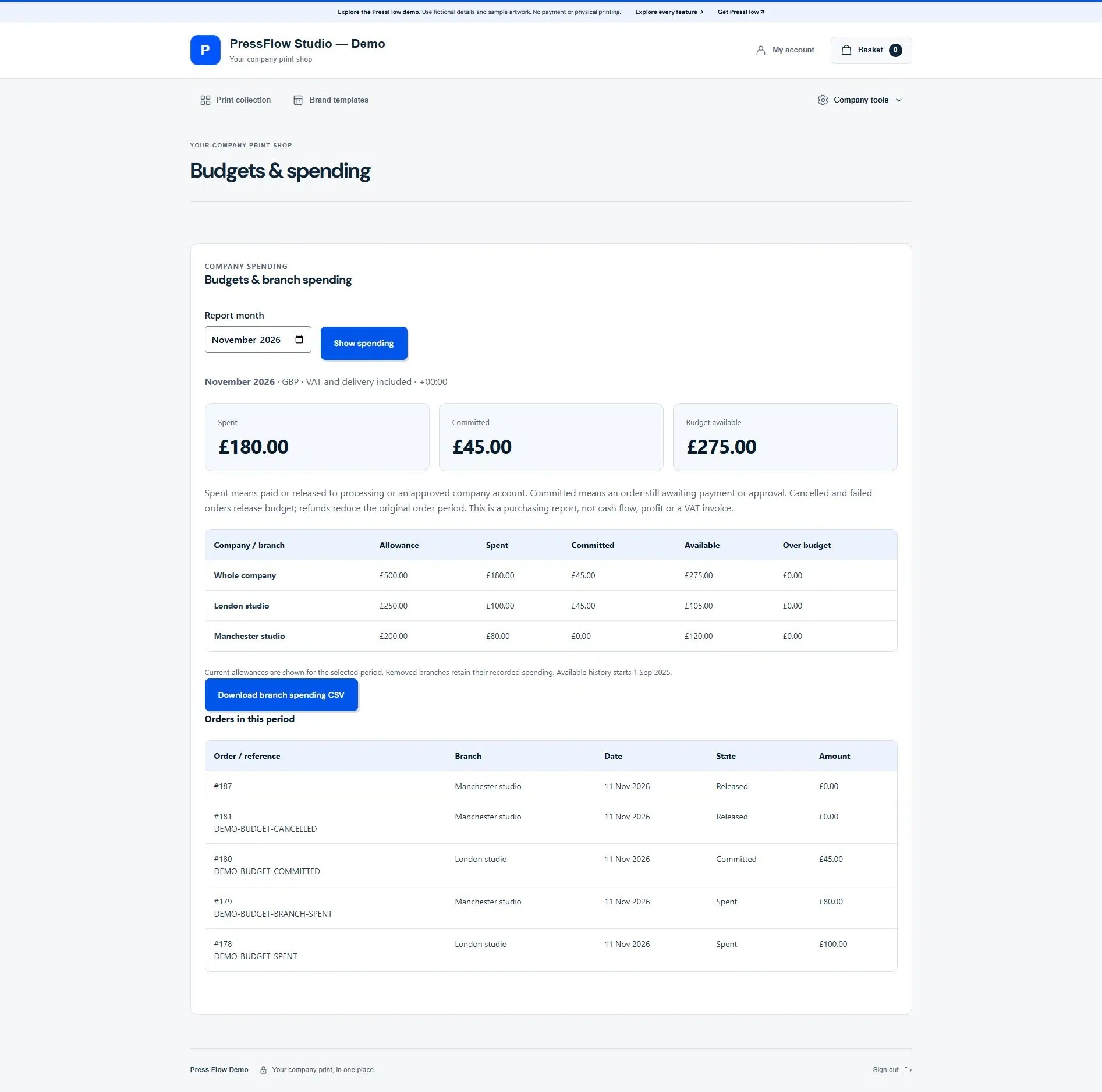
Set an allowance for the whole company and optional limits for its approved delivery branches. Choose a calendar month or quarter and decide whether an over-budget order shows a warning or requires financial approval. Amounts cover the complete order, including VAT and delivery.
UNDERSTAND WHAT IS COMMITTED
See available budget before the next order.
Pending orders reserve allowance. Paid or released orders count as spent. Cancellations release the reservation and refunds reduce the original period. Approvers get branch comparisons, order references and CSV downloads; purchasers see the available allowance for their company and selected branch.
Budgets control purchases within a period. Credit limits control unpaid balances. An approved budget exception does not waive the separate credit, payment or artwork requirements.
YOUR PRINT BUSINESS. CONNECTED.
Choose the tools. Or have the whole shop built.
All built-in PressFlow tools are included in your licence. Use your own WooCommerce website or have Fell & Harbour build the complete print shop.