
Company portals
Invite colleagues to a company portal
Choose company roles and branches, send invitations and manage acceptance or revocation.
Guide source reviewed for PressFlow 2.0.5.
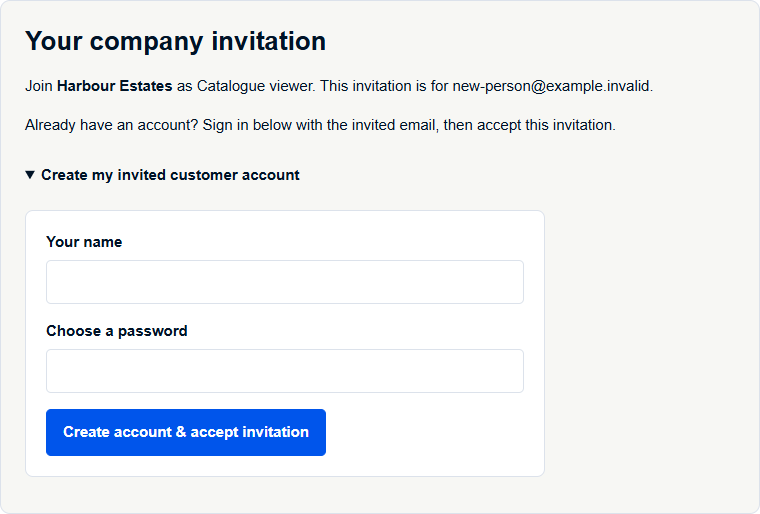
Company administrators and the printer can invite colleagues directly. They choose the company role and permitted branch before sending. The colleague follows a private email link, signs in or creates an invited customer account, then explicitly accepts. Opening the email link alone does not grant company access.
Send an invitation
- The printer opens PressFlow → B2B storefronts → Manage company → Company setup & team. A company administrator opens Company portal → Team.
- In Invite a colleague, enter their email, choose their role and permitted delivery branch. Company administrators have company-wide address access.
- Select Send company invitation. Check Invitations awaiting acceptance.
- Ask the colleague to accept within seven days, using the exact invited email.
Use Catalogue viewer for browsing only, Purchaser for normal ordering, Purchasing approver for financial review, or Company administrator for trusted team managers. None grants WordPress administrator capabilities. Approval workflows still prevent approving one's own order and enforce separate review levels.
Customers already in another company need the printer to review/remove that membership first. Shop administrator accounts cannot join; create a separate customer login for testing. A current same-company member should be edited under Members, not reinvited.
Control account creation
Under PressFlow → B2B storefronts → How this shop sells, use Allow invited colleagues to create their own customer accounts. It is enabled by default. When disabled, create the customer account through the normal WooCommerce tools; the colleague can still sign in and accept their invitation. This invitation setting does not open general public registration or change the shop's WooCommerce settings.
New invited accounts use WooCommerce's customer-creation API and registration hooks. The invitation asks for a name and a 12–256 character password. Registration plugins can reject the request through the usual server-side WooCommerce validation. If the site requires signing in separately after registration, PressFlow respects that. Test any additional account-verification/registration plugin on the real website.
Withdraw, resend or troubleshoot
- Wrong address/role/branch: revoke the invitation and send a new one.
- Expired link: send a new invitation. Links expire after seven days.
- Email failed: check WordPress outgoing mail, revoke the old invitation and send a replacement. Mailer handoff does not prove delivery; inspect spam/SMTP logs too.
- Wrong signed-in account: sign out, then sign in with the invited email.
- Company paused, branch removed or inviter no longer authorised: a current company administrator/printer must review access and issue a valid invitation.
- Already accepted: manage the colleague under Members. Revoking an unused invitation cannot remove membership granted by an accepted one.
There is a limit of 100 pending invitations and 100 sent per company in an hour. Daily cleanup removes expired/revoked invitation records without removing members. An older invitation cannot silently replace an existing member's role.
Privacy and developer notes
Treat the email link as private. Its random token is stored only as a SHA-256 digest;
it is bound to the saved email, company, role and branch. Acceptance requires a valid
form token and current server permissions. The GET page is private/no-cache, noindex
and sends a no-referrer policy. Exclude the pfw_company_invite parameter, My Account,
company pages and logged-in sessions from page/CDN caching. Do not log/share raw links.
Invitations use non-autoloaded options, separate company/invitation/user leases and
ordinary WooCommerce customer accounts. These internal storage keys are not public
extension APIs. Custom registration fields should use WooCommerce's rendering and
validation hooks; custom code must not grant membership from an unverified email or
browser-supplied role. Daily cleanup uses pfw_b2b_invite_cleanup.
Need a hand?
Contact the PressFlow team with details of what you are trying to do.