
Pricing
Estimate production costs and contribution
Check entered production costs, waste, allocated payment fees and discount scenarios privately.
Guide source reviewed for PressFlow 2.0.5.
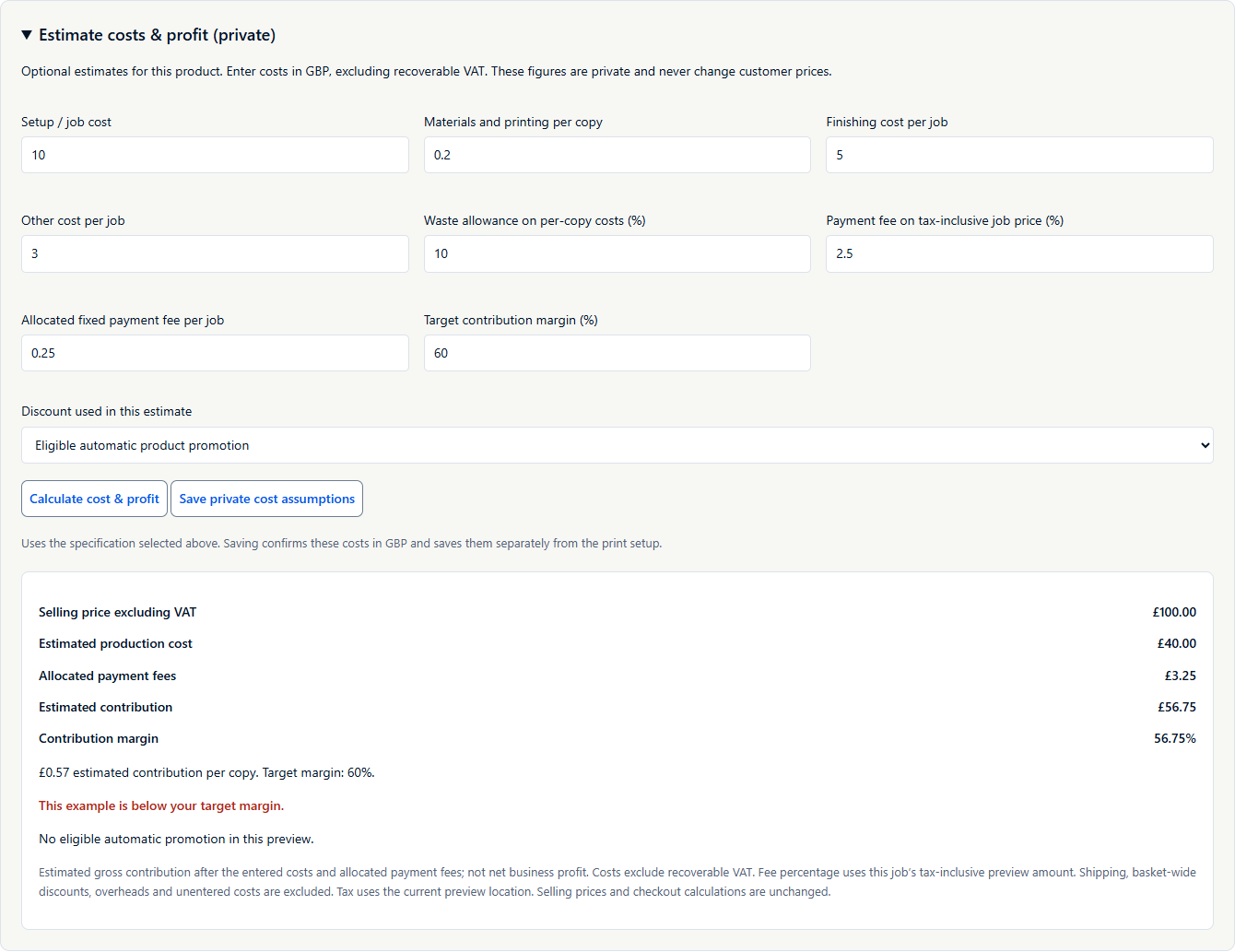
Open PressFlow → Print products, choose a product and open its guided print setup. In Step 6 — Check prices, expand Estimate costs & profit (private). This panel is available for native PressFlow price lists. Supplier-owned products use their supplier pricing/cost tools; PressFlow does not guess supplier costs.
Add your costs
Enter costs in the shop currency that your business can recover:
| Field | Enter |
|---|---|
| Setup / job cost | One-off setup for the complete job. |
| Materials and printing per copy | Your variable cost for one finished copy. |
| Finishing cost per job | The complete job's finishing cost. |
| Other cost per job | Any other production cost allocated to this job. |
| Waste allowance | Percentage added to per-copy production costs only. |
| Payment fee percentage | Estimated fee calculated on this job's tax-inclusive preview selling price. |
| Allocated fixed payment fee | The fixed fee share allocated to this job; avoid charging the whole transaction fee to every item in a multi-job basket. |
| Target contribution margin | Your target percentage of the selling price. |
Choose the specification/quantity in the example controls above. Select Calculate cost & profit. To retain the assumptions for this product, select Save private cost assumptions. This saves separately from the print configuration; it does not change selling prices or count as a saved/verified price list.
The result shows selling revenue, estimated production costs, allocated payment fees, estimated gross contribution and contribution margin. A low-margin message compares this example with your target; it does not rewrite your prices.
Example: 100 copies at £0.20 variable cost plus 10% waste cost £22. Adding £10 setup, £5 finishing and £3 other costs gives £40 production cost. At £100 revenue excluding VAT and an allocated £3.25 payment fee, estimated contribution is £56.75 (56.75%). These are illustrative assumptions, not a suggested price or a tax rate.
Check discounts
Select eligible automatic product promotion, no promotion, or a hypothetical percentage. A hypothetical percentage replaces the automatic promotion for this preview; it does not stack both or create a coupon. The normal WooCommerce coupon rules and company purchasing rules still determine actual basket discounts.
The current preview location and WooCommerce tax APIs determine displayed tax. Quote-only or otherwise unpriced examples remain unpriced. A zero selling price has no meaningful percentage margin. Missing/all-zero production assumptions are flagged for review rather than treated as proof that production is free.
Understand the result
Contribution is revenue after the entered costs and allocated fees. It is not net business profit. Shipping, basket-wide discounts, unentered overheads, actual payment-provider settlements and your accounting position are not automatically included. Review representative sizes, quantities, finishes and production dates. Change one of those choices and calculate again; an old result becomes stale.
Costs are private product metadata, outside customer configuration, catalogue prices and the Store API. Only users who can manage the relevant print product can save or preview them. Changing the shop currency requires review and resaving the assumptions; PressFlow does not silently convert saved costs between currencies.
Developers: _pfw_cost_estimate is private revisioned metadata, protected by the
existing product lock, permissions and request nonce. Do not copy it into public
configuration exports, price responses or frontend product data. Preview calculations
must not modify the cart, tax settings, order totals or public price-check hash.
Need a hand?
Contact the PressFlow team with details of what you are trying to do.