
Getting started
Use Ready to sell to prepare and check your shop
Choose a shop plan, resolve setup issues, check products and record actual customer tests.
Guide source reviewed for PressFlow 2.0.5.
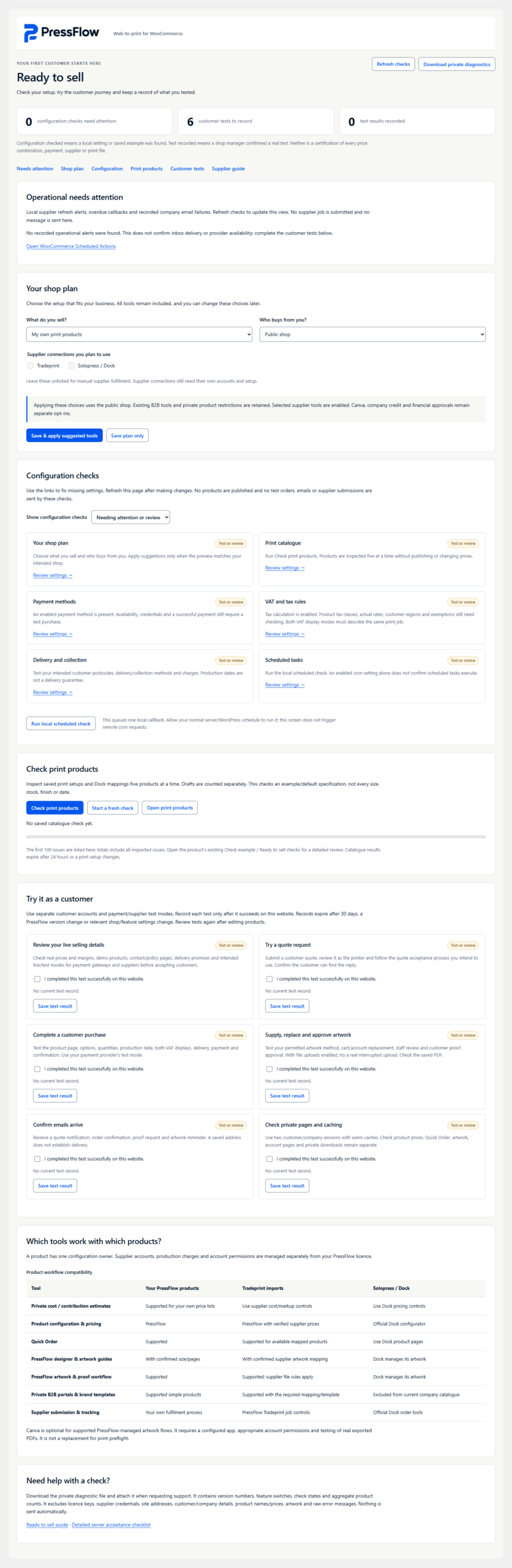
Open PressFlow → Ready to sell. Use this screen when setting up the shop and after making important changes. It brings local configuration checks, a product scan and your own customer test records together. It does not automatically publish products, take payments, send test emails, submit supplier jobs or send diagnostics to PressFlow.
1. Choose your shop plan
Choose What do you sell?: your own products, supplier products or both. Choose Who buys from you?: a public shop, private company portals only, or both. If you intend to connect Tradeprint or Solopress/Dock, select those suppliers.
- Save plan only records your intentions without changing live tool switches or storefront visibility.
- Save & apply suggested tools enables B2B when requested and enables your selected supplier tools. Private company portals only sets B2B-only visibility; public/hybrid plans use public-shop visibility. Read the preview before applying it.
- Other enabled tools are retained. Canva, company credit and financial approvals remain separate opt-ins under PressFlow settings → Features & integrations.
- Supplier accounts, credentials, company members and products still need configuration. Enabling a supplier can resume its existing scheduled price refreshes.
The first-time settings wizard offers the same plan after the product key. It then continues to appearance, optional features and demo products. Demo installation is optional and creates drafts. Finishing the wizard opens Ready to sell.
Dock products currently use Dock's own workflow and are excluded from private company catalogues. Choose a public/hybrid shop for Dock products. PressFlow/Tradeprint products can be used in the supported private company flows.
2. Review configuration
The default view shows configuration needing attention or review. Use Show configuration checks → All configuration checks to see detected settings too.
| Status | Meaning |
|---|---|
| Needs attention | A concrete missing setting, unsupported plan or failed product check was found. Follow Review settings. |
| Test or review | Detection cannot establish the actual result. Test it or review the relevant setup. |
| Configuration checked | A local requirement/setting was detected. It does not prove a live purchase or complete compatibility. |
| Test recorded | A shop manager confirmed the corresponding customer test for this setup. |
| Information / Not in use | Useful scope information or a workflow not required by the scanned catalogue. |
The screen checks licence state, declared platform minimums, HTTPS URLs, assigned WooCommerce pages, enabled payment methods, tax setup, uploads, quote notification address and relevant optional tools. Company approval/credit gateways do not count as public payment methods. A quote-only PressFlow catalogue can omit its basket/checkout; other purchasable WooCommerce products still need checkout/payment configuration.
Credentials being present is not proof of a supplier connection. Canva credentials being saved is not proof of authorisation, app approval, plan entitlement or printable PDF output. Test these with real accounts. Tradeprint sandbox mode is identified separately; switching to production does not convert sandbox imports into live products.
Check scheduled tasks
Select Run local scheduled check. This queues one local WordPress callback; it does not make a remote loopback request or send email. Allow normal WordPress/server cron to run it. The card updates after completion, or refresh this page later. The screen polls briefly while waiting; it does not keep polling indefinitely.
If queueing fails, the screen reports the failure and permits a retry. If a queued check has not run after five minutes, review the host's cron configuration. Ask the host to verify its schedule when WordPress cron is disabled. One successful callback does not establish that every reminder, email or supplier price refresh succeeded.
3. Check print products
Select Check print products. Each request inspects up to five matching product records, using saved PressFlow setups and Dock mappings. The scan does not enumerate every option combination or contact suppliers. Pause stops the browser's next work; a batch already completed on the server remains saved. Continue product check resumes it safely, including after a lost response or page reload.
The scan counts published/enabled products separately from drafts/disabled products. It checks a saved starting specification or a bounded example using listed/minimum quantity and minimum valid dimensions. It identifies invalid/unpriced examples, automatic promotion problems, missing base tax rates, supplier verification issues and published demo/sandbox names. A configured zero tax rate remains valid. A quote-only product retains quote behaviour; no nominal WooCommerce price is treated as its price.
The scan is not proof that every quantity/date/stock combination is priced, that an example is the absolute lowest price, or that a product is purchasable by every customer. Use the product's existing Check example and product readiness tools for important alternative specifications. Customer location, exemptions, stock, company access and production cutoffs still matter.
Results are private to the shop manager who ran the scan and expire after 24 hours or a relevant saved product setup changes. Another manager can run their own check. The first 100 issues are listed; counts include all inspected issues. Fix those and rescan, or use Print products for the full catalogue.
4. Record customer tests
Use a separate customer account/browser. Test public checkout, quote requests, artwork replacement/proofs, emails and private cached pages. Relevant optional tools add tests for Quick Order, suppliers, B2B roles, approvals, credit and Canva.
Check I completed this test successfully on this website, then select Save test result. Clear the checkbox and save to remove a record. Records are dated and apply to the current version and relevant shop/feature settings. They expire after 30 days or a relevant settings/version change. Re-test after product changes too.
A stale form cannot record acceptance for newly changed settings. Unsaved test choices are preserved during status updates; if settings changed elsewhere, reload and review before recording the result. Human records do not suppress concrete configuration errors, such as a missing checkout or a disabled licence.
For company credit, test concurrent purchases and payment/refund recovery on your actual server. Monthly account summaries are not VAT invoices. Indexed account storage, bounded conversion, recovery exports and the native database fixture scope are described in CREDIT-STORAGE-PLAN.md. Hosting capacity still depends on the actual server, cache and order integrations.
Operational needs attention
This separate panel shows recorded company email failures, saved Tradeprint refresh alerts, recent failed/overdue supplier background work and overdue PressFlow cron callbacks. Viewing it makes no supplier requests, submissions or mail sends. Follow Review affected work or Review notification record for the relevant settings/order. A recent failed task can already have been resolved by a later task; review its log before retrying work. Check WooCommerce Scheduled Actions and the host scheduler when tasks are late.
Approval notifications retry missing recipients up to three scheduled attempts. Manual retry controls are in the company financial/billing screen. Invitation mail failures are also shown; revoke the old invitation and send a replacement. A normal mail handoff is not evidence of inbox delivery. Acknowledge reviewed notice hides that stored alert only; it does not resend a message, retry an order or repair a connection. Up to 50 stored email alerts are shown at once.
See FEATURE-AVAILABILITY.md for native/Tradeprint/Dock scope, COST-PROFIT.md for private cost estimates and B2B-INVITATIONS.md for colleague onboarding.
5. Download diagnostics when requesting support
Select Download private diagnostics. Only a logged-in user with Manage WooCommerce permission and a valid form token can download the JSON file. It stays on your computer until you choose to share it.
Included: PressFlow/WordPress/WooCommerce/PHP versions, shop-plan enums, currency/tax flags, feature switches, built-in check states, manual test dates and aggregate scan counts. Excluded: licence keys/tokens/hints, supplier/Canva credentials, site addresses, installation IDs, user/customer/company details, emails, order records, product names/prices/options, artwork, server paths and raw error messages. This is an explicit allow-list, not a WordPress options dump. Other developers' custom check data is omitted.
Nothing is sent automatically. The file describes detected configuration and recorded tests; it does not prove payment, mail, supplier or Canva connectivity.
Developer extension
Add local advisory checks with pfw_launch_additional_checks (arguments: empty check
list, shop-plan summary). This is a read-only admin screen: use local or previously
verified state, and avoid HTTP requests or mutations inside the filter.
add_filter('pfw_launch_additional_checks', function ($checks, $plan) {
    $configured = get_option('my_dispatch_setup_complete') === true;
    $checks[] = [
        'key'    => 'dispatch_setup',
        'title'  => 'Your dispatch workflow',
        'status' => $configured ? 'checked' : 'review',
        'detail' => $configured
            ? 'Local dispatch settings are present. Test an actual dispatch separately.'
            : 'Configure dispatch before accepting print orders.',
        'url'    => admin_url('admin.php?page=my-dispatch-settings'),
    ];
    return $checks;
}, 10, 2);
Up to 30 custom rows are accepted. Keys use lowercase letters, numbers and underscores
(1–40 characters); duplicates are ignored and rendered keys receive custom_. Title
and detail are plain text. Valid statuses are action, review, checked, recorded,
unused and information; reserve recorded for a real established test result.
Fix links must stay inside the local administration origin/path. Custom check contents
are excluded from diagnostics. Internal option/transient keys and the scan transport
are not public persistence APIs; do not change customer prices through this screen.
Need a hand?
Contact the PressFlow team with details of what you are trying to do.